Emulator not optimized for touch.
Classic Windows card game
Solitaire.exe: The Game That Taught a Generation to Click
Rediscover the familiar green felt table, crisp pixel-era cards and satisfying challenge of Klondike Solitaire. This browser-based tribute brings the spirit of the Windows 3.0 classic to your desktop.
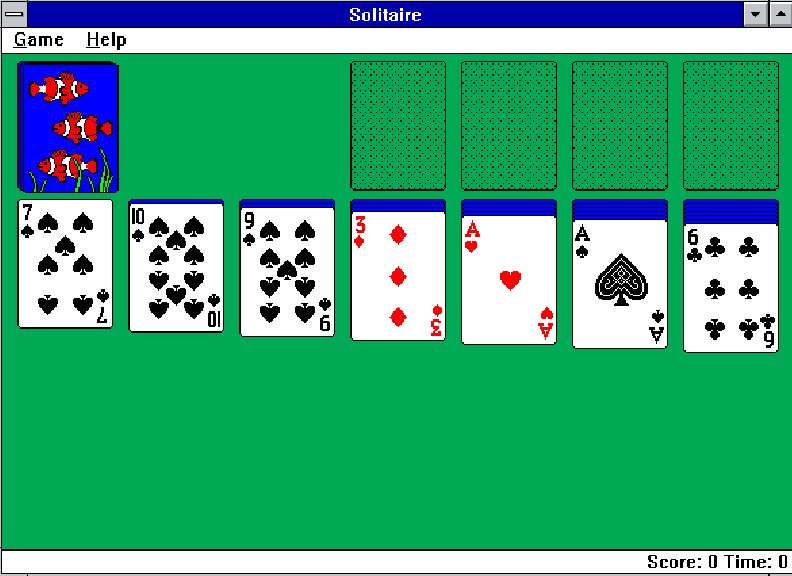
How Solitaire Works
The objective is simple: build four foundation piles, one per suit, from Ace through King. Arrange cards on the seven tableau columns in descending order and alternating colors to uncover hidden cards.
- Tableau: Move descending sequences of opposite colors.
- Foundations: Start each suit with an Ace and build upward.
- Stock: Draw new cards when you need another move.
- Mouse controls: Click and drag cards; some versions also support double-click shortcuts.
Read the complete Solitaire rules and strategy guide →
Three Tips for Better Play
>> REVEAL HIDDEN CARDS
Favor moves that turn a face-down tableau card face up.
>> THINK BEFORE EMPTYING A COLUMN
Only a King (or a sequence led by a King) can fill an empty tableau column.
>> DON'T RUSH EVERY CARD TO THE FOUNDATION
A card may still help you build alternate-color sequences on the tableau.
A Little Windows History
Microsoft included Solitaire with Windows 3.0 in 1990. Programmed by Wes Cherry, with memorable card artwork by Susan Kare, the game introduced many PC users to pointing, clicking and dragging with a mouse. It became a familiar part of everyday computing.
Explore the history of Windows Solitaire →
Why Play Here?
SolitaireExe.com focuses on a nostalgic desktop experience: classic Windows-style framing, a familiar card table, and the freedom to jump straight into the game without installing an executable.
Other Solitaire Games from the Retro Era
Want to compare the classic Windows game with other interpretations? Two games in the broader retro gaming library are Solitaire's Journey for DOS and Solitaire FunPak for Game Boy. These offer a look at how card games found their way onto different systems.
Frequently Asked Questions
Is Solitaire.exe a virus?
No. Solitaire was a legitimate program distributed with Windows. This page launches a game in your browser rather than asking you to download an EXE file.
What type of Solitaire is this?
The familiar Windows version is based on Klondike: seven tableau columns and four foundations.
Can I play full screen?
On desktop, use the Fullscreen control above the embedded game. Full-screen support also depends on your browser.
Can I play on my phone?
The desktop emulator is designed around mouse controls. On a phone, the mobile panel directs you to a touch-friendly Solitaire alternative.